VDownloader 5.6.1
- Categoría: Youtube
- Licencia: Freeware
- Tamaño: < 1 KB
- Sistema: w98 wNT wME w2000 wXP Vista w7 w8 w10
- Idiomas:


Download videos from YouTube, Google Video and so on, directly to your hard drive in MPG or AVI formats.
As you will have no doubt already worked out just from the name, VDownloader lets you download videos from YouTube, Google Video and so on, directly to your hard drive in MPG or AVI formats (but not in FLV).
As we all know, you can watch all these videos as much as you want on their websites, but they can`t be downloaded. And the majority of programs that let you download them do so in FLV format.
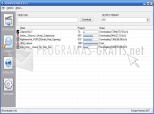
VDownloader works very simply: just copy the video`s URL that you want to download, and click on Download. The only requirement is that you decompress all files in the same hard drive directory. VDownloader .exe and ffmpeg .exe need to be in the same directory, because if not, the program can`t convert them correctly. You can play video or audio while travelling or on holiday on your MP3, mobile device or laptop, watch videos without annoying advertisements, captions or other distractions, make backups of online videos in any possible format; they might be lost or removed, skip queueing and buffering thanks to the automatic video download accelerator, etc.
This program is very easy to download, install and then use, through its friendly and intuitive user interface. You don't need any technical experience at all to get the most out of it.
So there you have it. If you , then you need a program like this . And best of all is that you can download it for free! What are you waiting for?
DownloadVDownloader 5.6.1 related downloads
YouTube Song Downloader 2023
 Download
Download your favourite songs and videos from YouTube to your PC.

YTD Video Downloader 5.7.4
 Download
Fast and effective manager for downloading and converting videos.